
CIMCO Machine Simulation

CIMCO Machine Simulation – The Complete Simulation Solution for CNC Machining
CIMCO Machine Simulation offers a comprehensive range of features for complete NC code simulation in a 3D machine environment. Designed to complement CIMCO Edit, this add-on enables dynamic analysis of CNC toolpaths using versatile simulation tools. Its interface, familiar from video playback software, makes it intuitive and user-friendly, allowing you to view the simulation from different angles and distances with zoom, pan, and rotate functions.
Confidence and Efficiency Through Simulation
CIMCO Machine Simulation helps eliminate costly programming errors and speeds up commissioning by providing a cost-effective and easy-to-use CNC machine simulation solution. By simulating NC programs in three-dimensional machine setups, you can see the precise movements of components, such as rotating heads and spindles, as well as supporting equipment. Collisions and travel-limit violations are detected automatically, ensuring that error-free code is sent to the physical machine.
- Machining Safety: Protect personnel and machines from dangerous situations by simulating and testing your NC programs on a computer before running them on physical machines.
- Faster Commissioning: Reduce the time required for startup and calibration. Once the NC program has been thoroughly simulated on a computer, it can be run with confidence the first time.
- Fast Changes and Optimization: Optimize your programs by quickly trying out new ideas and testing changes on a computer. Save time, resources, and machining tool wear while smoothly switching between machine configurations.
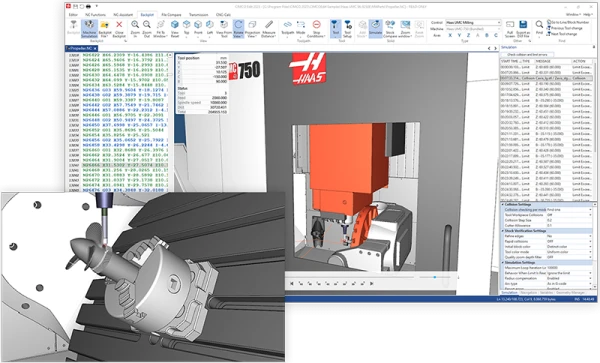
CIMCO Simulation and NC Program Editing
CIMCO Machine Simulation combines simulation and NC editing in a fully integrated solution, providing an efficient way to quickly simulate programs and correct code issues. By using the simulation's 3D features, you can train employees to operate machine tools and edit NC code before physical testing.
- Complete Simulation Control: Analyze your NC program simulation from any angle or distance by zooming, panning, and rotating the view. An adjustable speed slider works in both directions, and you can jump to the next or previous tool change, block, or movement.
- Stock and Geometry Management: Define the stock and load STL files for the workpiece, fixtures, and other components. The resulting stock can be exported as an STL file for further processing.
Monitoring and Verification
CIMCO Machine Simulation provides a parallel view of the NC code, simulation, and simulation report. During simulation, components involved in collisions are highlighted automatically. Collisions, limit violations, and programming errors are detected and reported in the simulation report. This feature makes it easier to identify and correct errors, improving programming quality.
Simulation Report: The automatic simulation report generates a detailed list of all errors in your NC program. Select any reported error to jump directly to the line causing it. Edit the NC code, and the simulation report updates so you can immediately see whether the issue has been resolved.
Machine Configuration and Integration
Download and install preconfigured machines directly into CIMCO Machine Simulation, or build your own using the Machine Configuration Editor. You can also seamlessly integrate tools, holders, and geometry from Mastercam or other CAM systems into Machine Simulation. This makes it easier to manage changes in the CAM system and update them in the simulation or backplot.
CIMCO Machine Simulation is a solution that takes simulation and quality assurance in your industry to the next level. Giving you the tools to improve production efficiency and reliability while avoiding unnecessary programming errors, it helps you take the next step toward smoother and safer production.


