
Mastercam Mill 2D Along Curves

Mastercam’s Along Curves toolpath is designed specifically for shapes where the geometry being machined changes along the toolpath. This method prevents the unnecessary air cutting that conventional profile toolpaths with side cuts would cause, enabling more accurate and efficient machining.
Description: The Along Curves toolpath is ideal for changing shapes where conventional profile toolpaths are not efficient. This operation allows you to define two boundary curves between which the toolpath adapts to the shape of the part. This ensures that the tool follows the part geometry accurately, saving time and reducing material waste.
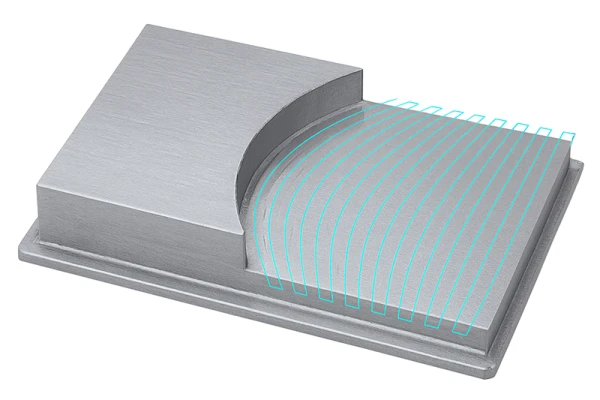
Key Features:
- Changing Machined Shapes: Particularly suitable for shapes whose geometry changes during machining.
- Boundary Curves: Define two boundary curves between which the toolpath adapts to the shape of the part.
- Reduced Air Cutting: Avoid unnecessary air cutting to improve efficiency and reduce machining time.
- Accuracy: The tool follows the defined shapes precisely, ensuring a high-quality and accurate result.
Applications
- Changing Geometries: Especially effective when the shape being machined changes along the toolpath.
- Complex Parts: Suitable for complex geometries that are not uniform.
- Problematic Situations: Avoids unnecessary air cutting, which is common with conventional profile toolpaths.
Benefits
- Efficiency: Reduces unnecessary air cutting, saving time and reducing tool wear.
- Accuracy: Enables more precise machining by following the shape of the part accurately.
- Flexibility: Suitable for a wide range of changing geometries and complex parts.
- High-Quality Results: Improves the quality of the finished product by precisely following the defined shapes.
Tips
- Chain the toolpath to solid geometry whenever possible. When possible, chain the toolpath from the depth at which you want the tool to move. As a general rule, always use incremental depths for the transition parameters.
- Simulation: Use Mastercam’s simulation features to verify that the toolpaths operate correctly and safely before actual machining.
- Parameter Adjustments: Adjust the machining parameters carefully to achieve optimal results and avoid unnecessary air cutting.
- Save different operation defaults in a custom operation library so that, in the future, you can quickly and easily create operations for different situations by selecting the custom operation parameters.
Summary
Mastercam’s Along Curves toolpath provides an ideal solution for changing shapes where conventional profile toolpaths are not efficient. By defining two boundary curves between which the toolpath adapts, this method ensures accuracy, efficiency, and high-quality results. This operation is an excellent choice for complex and changing geometries that require precise and reliable machining.


