
Mastercam Mill 2D Profile
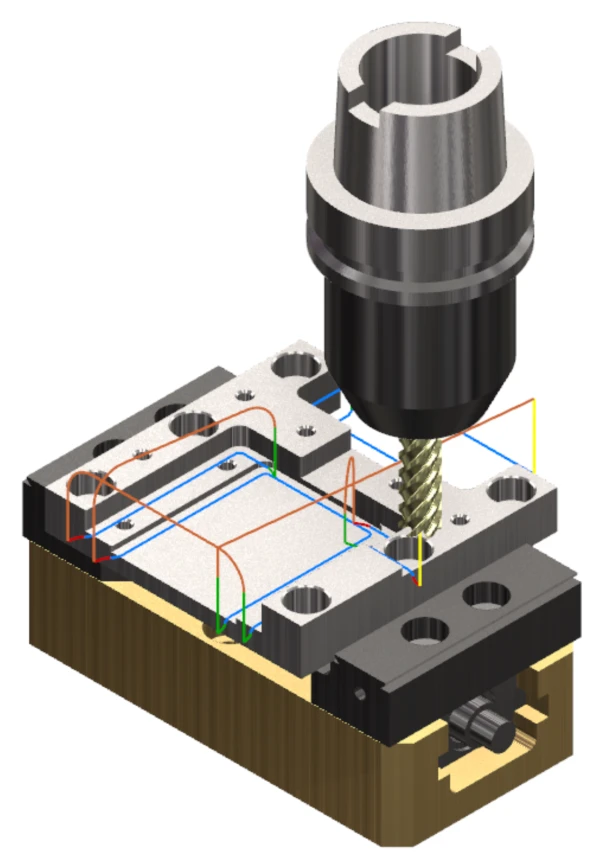
Mastercam’s Profile operation provides versatile options for creating profile toolpaths for a variety of geometries. With this operation, you can easily define tool motion along chained geometry, either along the tool centerline or the edge of the tool. The Profile operation supports several different machining types, including 2D, 3D, chamfering, ramping, and oscillating toolpaths.
Mastercam’s Profile operation is a flexible machining operation that enables you to create both simple and complex machining profiles. This operation can be used on two-dimensional (2D) and three-dimensional (3D) geometry, and it can also be used for chamfer milling or rest machining. In addition to chamfer mills, chamfer milling supports corner-radius and ball-nose end mills. In a Profile toolpath, you can also define the external and internal corner radii. The external corner radius removes sharp corners caused by machining, improving the finish and safety of the product. The internal corner radius prevents linear tool movements at internal corners, reducing vibration and tool breakage. The feed rate for external and internal arcs in the machining operation can also be adjusted on the Arc Filtering/Tolerance tab. Adjusting this parameter enables smoother, more consistent toolpaths.
Profile Types
- 2D Profile: Used for 2D milling, such as finishing the contours of workpieces.
- 3D Profile: Suitable for more complex three-dimensional geometries, but does not support tool-shape compensation against the workpiece. It can therefore be used only in applications such as machining the edge of a bent sheet over the full cutting length of the tool.
- 2D Chamfer and 3D Chamfer: Enable chamfer milling along the edges of workpieces.
- Ramp: Used when you want the tool to move in the Z direction into the material while following the toolpath.
- Rest Machining: Finishing profiles for workpiece geometries that a previous tool was unable to machine completely because it could not fit into the entire geometry.
- Oscillating: Moves the tool back and forth across the entire cutting edge, distributing tool wear evenly.
Multiple Lateral and Depth Cuts
The Profile operation allows you to define multiple lateral and depth cuts using different methods. Depth cuts can also be applied to walls with draft angles.
Applications
- Finishing Toolpaths: Ideal for creating high-quality finishing toolpaths.
- Machining Complex Geometries: Suitable for a variety of two- and three-dimensional profile shapes.
- Chamfer Milling: Enables deburring with corner-radius tools as well, reducing tool changes and freeing up tool stations.
Benefits
- Versatility: Supports many different profile types.
- Accuracy: Enables the creation of highly accurate and demanding geometric profiles.
- Finishing: Provides excellent tools for finishing toolpaths, improving the quality of the finished product.
- Ease of Use: Offers multiple operating settings and parameter adjustment options, making Profile machining user-friendly.
Tips
- When using cutter radius compensation in the control, make sure that the lead-in and lead-out distance is at least 50% of the tool diameter.
- Whenever possible, chain the toolpath to Solid geometry. When possible, chain the toolpath at the depth where you want the tool to move. As a general rule, use incremental depths in the linking parameters.
- Verify the optional variables for the postprocessor being used to support precision machining when necessary.
- When the Maximum radius option under Arc Fitting on the Linking Parameters tab is used, linear linking moves between toolpath chains can be smoothed. Note that most machine tools require arcs in the Z direction to be executed as feed moves.
- Simulate the toolpaths using operation verification to avoid potential collisions, including collisions between operations.
- Save different profile types with various approach and retract parameters to the custom operations library. This allows you to quickly and easily create different situations in the future by selecting custom operation parameters.
Summary
Mastercam’s Profile operation offers a wide range of profile-style toolpaths, making it an excellent choice for precise and complex machining tasks. Its versatile settings and parameters help achieve a high-quality finish and optimal tool usage when programming any machine tool.


